Files by Google stands as Android’s most trusted native file management solution, offering intelligent storage optimization alongside secure wireless file sharing. With over 5 billion downloads and a 4.5-star rating from 8.64 million users, this Google-developed app combines essential file management with innovative features like Quick Share for offline transfers and smart cleanup recommendations that identify unused apps, duplicate files, and low-resolution videos taking up valuable device space.
How to Get Started with Files by Google
The onboarding process is designed for immediate usability—no complex configuration required. Launch the app and you’ll see two primary tabs: Storage and Files, with Quick Share controls at the bottom for file transfers.
- Explore Storage Tab – View your device storage breakdown, identify space-consuming apps and files, and access personalized cleanup recommendations within the first screen
- Review Cleanup Suggestions – Files by Google analyzes your device and recommends deletion of duplicate photos, videos, chat app backups, and low-resolution media to free up space immediately
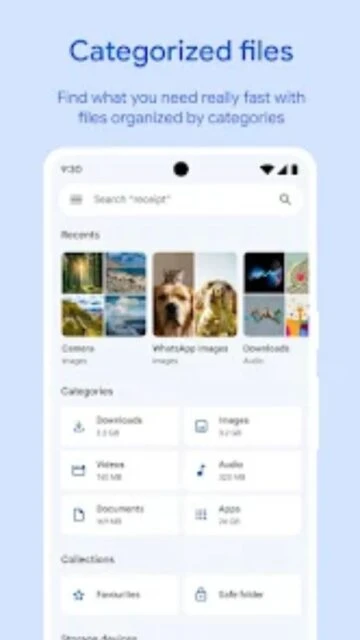
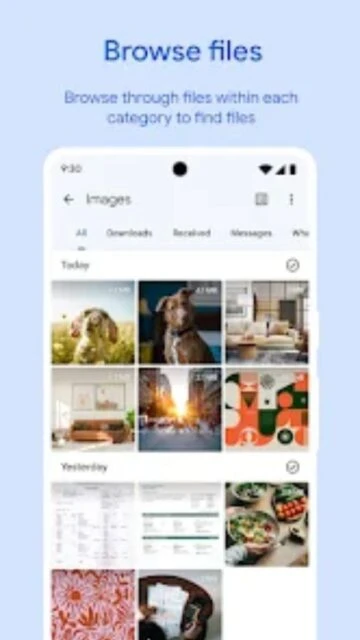
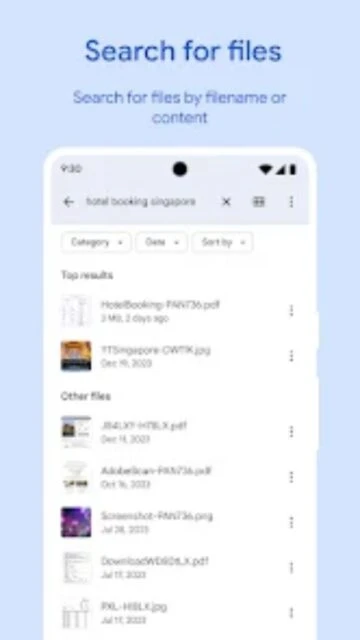
- Access Files Organization – Navigate to the Files tab where content automatically categorizes into Images, Videos, Documents, and Audio for structured browsing without manual folder navigation
- Enable Quick Share – Tap the Quick Share icon at the bottom right to activate wireless file transfers with nearby Android devices and Chromebooks without requiring internet connectivity
Who Should Use Files by Google
This app serves Android users across all technical proficiency levels who prioritize storage management and secure local file sharing without cloud dependencies or subscription requirements.
- Android Storage Managers – Users struggling with full devices who need intelligent cleanup and duplicate detection to reclaim gigabytes of space quickly
- Privacy-Conscious Sharers – Individuals requiring offline file transfers without uploading to cloud services, leveraging encryption for local device-to-device sharing
- Media Organizers – Those managing thousands of photos and videos who benefit from automatic categorization and quick access to recent downloads
- NOT ideal for – Users needing extensive folder customization, advanced SFTP/FTP access, or cross-platform iOS-to-Android transfers requiring alternative tools
Files by Google Platform Compatibility
Files by Google maintains comprehensive Android support with minimal version requirements, while Quick Share extends compatibility to Chromebooks and select Windows devices through native apps.
| Platform |
Min. Version |
Unique Features |
Limitations |
| Android |
Android 6.0+ |
Full file management, Quick Share at speeds up to 480 Mbps, offline transfers, storage optimization |
Scoped storage restrictions on Android 12+, limited app uninstall capabilities |
| Chromebook |
Chrome OS 65+ |
Quick Share receiver for file imports, cloud backup integration, file browsing |
No full file manager interface on Chrome OS |
| Windows |
Windows 10+ |
Quick Share app for receiving files from Android devices, clipboard sync capability |
Limited to file receiving only, no complete file management |
| Web/Cloud |
Modern browsers |
Google Drive integration, cloud backup management, remote file access |
Web version offers limited functionality compared to mobile app |
Files by Google Integrations & Ecosystem
Deep integration with Google’s ecosystem and third-party cloud services enables seamless backup workflows and cross-device file synchronization without manual intervention or additional authentication steps.
- Google Drive Integration – Backup files directly to Google Drive from the app with automatic organization, enabling cloud redundancy while preserving local device space
- Quick Share Network – Wireless file sharing with Android devices, Chromebooks, and Windows PCs at 480 Mbps using end-to-end encryption for secure transfers
- SD Card & USB Support – Manage external storage devices directly within the app, with storage status for attached USB drives and microSD cards
- Cloud Storage Flexibility – Option to backup to alternative cloud storage apps installed on your device beyond Google Drive, supporting Dropbox, OneDrive, and other providers
Best Alternatives to Files by Google
While Files by Google excels in simplicity and native Android integration, alternative file managers serve specific use cases requiring advanced features, open-source privacy prioritization, or platform-specific tooling.
- FX File Explorer – Best for power users requiring advanced features like SFTP/FTP access, file compression, and extensive customization with clean privacy-focused interface
- Amaze File Manager – Best for minimalists seeking free, open-source file management without ads, offering lightweight performance and offline-only operation without tracking
- Solid Explorer – Best for cloud integration specialists needing extensive support for Dropbox, OneDrive, WebDAV, and SFTP with advanced archiving capabilities
- Send Anywhere – Best for cross-platform file transfer requirements with iOS-to-Android support, large file handling, and cloud backup options via single secure link
Files by Google vs Top Competitors
Files by Google differentiates itself through Google’s native optimization and zero-cost operation, while competitors target users requiring specialized features like advanced cloud integrations or open-source architecture.
| Feature |
Files by Google |
FX File Explorer |
Amaze File Manager |
| Pricing |
Free, no ads, no premium tier |
Free with optional premium ($2.99) |
Free, open-source, no ads |
| Key Strength |
Native Android integration, AI-powered cleanup recommendations |
Advanced networking features (SFTP/FTP/SMB), file compression |
Lightweight, privacy-focused, open-source verification |
| Target Users |
General Android users prioritizing simplicity |
Power users managing networked storage and servers |
Privacy advocates and tech enthusiasts |
| Unique Feature |
Quick Share offline transfers at 480 Mbps to multiple devices simultaneously |
Built-in file archiving, terminal access, comprehensive permissions management |
Root file access, batch operations, script execution capability |
| Offline Mode |
Full offline file management and Quick Share transfers without internet |
Offline browsing available, local network transfers work without data |
Complete offline operation with no cloud dependencies |
Files by Google Privacy & Security Overview
Google implements end-to-end encryption for Quick Share transfers and storage device security through optional PIN/pattern locks, though data collection occurs for recommendation algorithms and device optimization.
| Security Aspect |
Implementation |
User Control |
| Data Encryption |
End-to-end encryption for Quick Share transfers, TLS encryption for cloud backups |
Encryption enabled by default for all transfers and backups |
| Authentication |
Device lock via PIN or pattern independent from device security, Google account verification for cloud features |
Users can enable/disable file lock, set custom PIN, use fingerprint unlock |
| Data Collection |
Collects app activity, personal info (user account), and device analytics for cleanup recommendations |
Opt-out of targeted advertising through device settings, no option to disable all analytics |
| Third-Party Sharing |
No data shared with third parties; Google may use analytics for product improvement |
Complete control over what uploads to Google Drive, manual backup selection |
Files by Google Accessibility Features
Files by Google includes comprehensive accessibility support through TalkBack screen reader integration and visual customization options, ensuring users with diverse abilities can navigate the app independently.
- Screen Reader – Full TalkBack support on Android with descriptive labels for all interface elements, file operations, and system recommendations
- Visual – Automatic dark mode support matching system settings, adjustable font scaling through device accessibility settings, high contrast options
- Motor – Full voice control support through Android’s voice assistant, gesture alternatives for touch operations, large tap target areas throughout interface
- Languages – Support for 100+ languages with right-to-left (RTL) text rendering for Arabic, Hebrew, Persian, and other RTL languages
Power User Tips for Files by Google
Maximize Files by Google’s utility through advanced cleanup strategies, Quick Share shortcuts, and integration techniques that streamline file management across your digital ecosystem.
- Multi-Device Quick Share – Select multiple recipients in Quick Share by tapping multiple devices to simultaneously transfer files to all nearby Android devices and Chromebooks
- Smart Duplicate Removal – The app intelligently identifies duplicate and similar photos taken in burst mode or edited versions; review before deletion to prevent losing intended shots
- Offline Media Playback – Use Files by Google to organize and play downloaded music and videos offline with advanced controls including playback speed adjustment and shuffle modes
- Chat App Backup Cleanup – Identify and remove large backup caches from WhatsApp, Telegram, and Signal that accumulate in your storage without manual deletion options
- Recent Files Access – Use the Files tab to quickly locate recently downloaded or modified documents without navigating folder hierarchies
Files by Google Support & Community
Google provides official documentation and support channels for Files by Google users, with active community discussions and response from development teams on feature requests.
- Official Help Center – g.co/help/filesbygoogle provides comprehensive guides covering Quick Share setup, cleanup recommendations, file organization, and troubleshooting procedures
- Community Forum – Google Support Community at support.google.com/files hosts user discussions, feature requests, and solutions from Google support specialists
- Social Media – @GoogleFiles on X (formerly Twitter) and Google’s official accounts share updates about new features and file management tips
- Contact Support – Submit feedback and report issues directly through the form at g.co/help/filesbygoogle with detailed error descriptions and device information
Files by Google Latest Updates & Roadmap
The December 2025 update (version 1.9456.838368644.0) introduced UI enhancements for better user experience alongside performance optimizations. Google continues enhancing Quick Share reliability, improving device discovery speed, and expanding platform compatibility to additional Windows devices. Future updates will focus on AI-powered file recommendations, enhanced cloud storage integrations, and advanced batch operation capabilities for managing large file collections more efficiently.