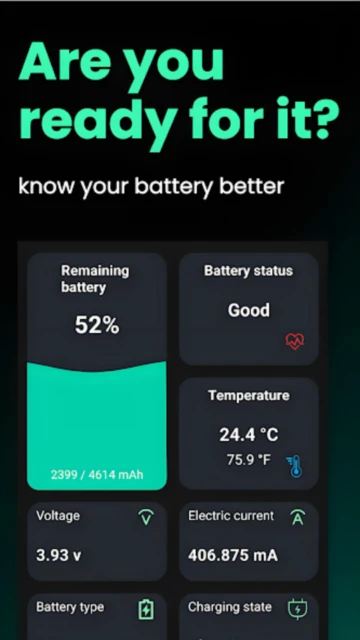
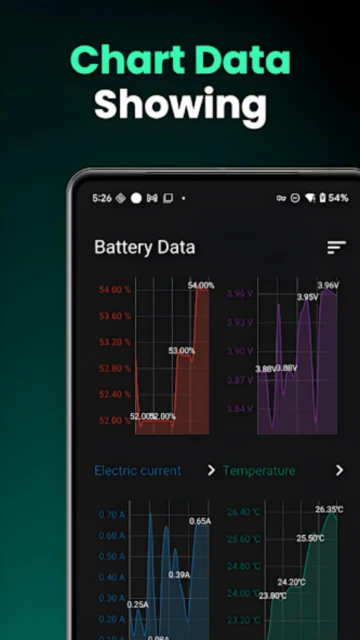
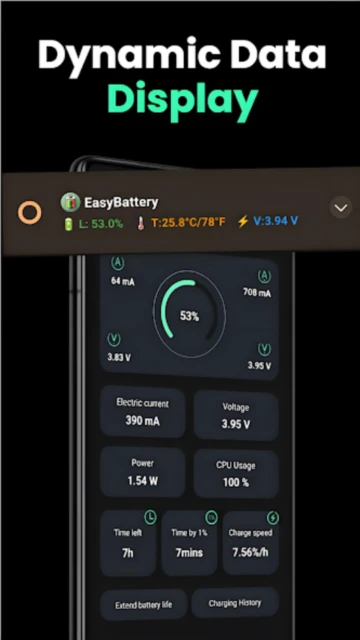
EasyBattery stands out as a specialized battery optimization tool designed for users who demand transparency into their Android device’s power consumption patterns and health status. Unlike generic battery apps, EasyBattery provides real-time voltage, temperature, and usage cycle monitoring combined with intelligent charging alerts that prevent battery degradation. This comprehensive guide explains setup procedures, target user profiles, platform capabilities, and power-user techniques for maximizing battery longevity and understanding device power behavior.
How to Get Started with EasyBattery
EasyBattery’s minimalist interface requires minimal configuration yet delivers comprehensive battery statistics immediately upon launch. The onboarding process prioritizes quick access to essential metrics while allowing deeper customization for power users.
- Install from Google Play – Download EasyBattery (version 6.3+ as of July 2025) from Google Play Store; app requires Android 6.0 minimum compatibility with 100K+ active users globally.
- Grant Device Administrator Permission – On first launch, allow EasyBattery access to battery statistics and device settings via Settings > Apps > EasyBattery > Permissions. This enables voltage and temperature monitoring without rooting.
- Set Custom Charging Alarms – Access the Alarms tab and create notifications for full charge (100%), low battery (15%), overheating (above 40°C), or abnormal power consumption thresholds specific to your usage patterns.
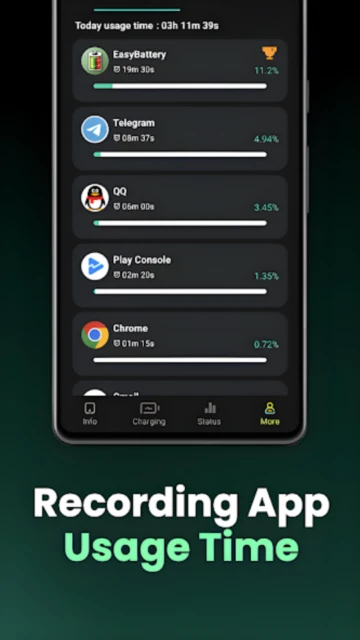
- Analyze App Power Consumption – Navigate to App Power Analyzer to identify battery-draining applications ranked by percentage consumption; uninstall or restrict background activity for top offenders.
Who Should Use EasyBattery
EasyBattery appeals to users prioritizing battery health monitoring over aggressive power-saving features. The app suits people requiring transparent device power metrics for troubleshooting battery issues or optimizing charging habits.
- Battery Health Advocates – Users seeking detailed voltage, current, temperature, and charge cycle statistics to understand battery degradation patterns; helps extend battery lifespan by 12-18 months through optimized charging.
- Frequent Travelers – Travelers valuing battery estimation tools that predict remaining usage hours under current consumption; essential for long flights or remote locations without charging access.
- Power Users & Developers – Technical users analyzing per-app power consumption patterns, CPU usage statistics, and resource utilization for device optimization and app performance troubleshooting.
- NOT ideal for – Users seeking aggressive battery power-saving (app lacks task killer or CPU throttling features); those wanting simplified one-tap battery boost will prefer AccuBattery or Battery Guru.
EasyBattery Platform Compatibility
EasyBattery operates exclusively on Android devices running version 6.0 (API 23) or higher. Version 6.3 (updated July 2025) includes daily/weekly app usage statistics and CPU monitoring features while maintaining compatibility across diverse Android manufacturers and customizations.
| Platform |
Min. Version |
Unique Features |
Limitations |
| Android Phone |
Android 6.0+ (Marshmallow) |
Real-time voltage/current monitoring, per-app power analysis, CPU usage statistics, daily usage tracking |
Requires device administrator permission; limited access on heavily restricted devices |
| Android Tablet |
Android 6.0+ |
Full compatibility with larger screens; app power analyzer scales to tablet resolution |
Same restrictions as phones; battery statistics may vary on tablet-specific hardware |
| Smartwatch |
Not Supported |
Not Available |
No Wear OS version exists; smartwatch companion apps lack battery monitoring features |
| iOS |
Not Supported |
Not Available |
Android-exclusive app; iOS users must use AccuBattery or Battery Guru alternatives |
EasyBattery Integrations & Ecosystem
EasyBattery operates as a standalone battery monitoring solution with minimal third-party integrations. The app communicates primarily with Android system services rather than external cloud platforms, prioritizing privacy and local processing.
- Android System Services – Reads native battery statistics APIs for voltage, temperature, and charge cycle data; no dependency on manufacturer-specific battery APIs.
- Widget Support – Home screen widget displays current battery percentage, temperature, and voltage in real-time without opening the app; multiple widget sizes available.
- Device Administrator Services – Requests device administrator access to deliver charging alarms that function even when the app is not running; alarms persist through device restarts.
- System Notifications – Integrates with Android notification system for overheating alerts, abnormal consumption warnings, and custom threshold notifications based on personalized settings.
Best Alternatives to EasyBattery
While EasyBattery excels in transparent battery health monitoring, alternative battery apps offer different emphasis on power-saving versus monitoring. These competitors serve users seeking aggressive optimization features or different interfaces.
- AccuBattery – Best for Battery Health Estimation, provides detailed health percentage and remaining lifespan prediction through advanced charging analysis; one-time purchase available ($3.99) versus subscription model.
- Battery Guru – Best for Aggressive Power Saving, includes task killer and background app restriction features; provides more intervention-based optimization than EasyBattery’s monitoring-focused approach.
- Battery Notifier Pro – Best for Advanced Alarms, offers repeating alarms at specific percentage intervals (every 5% increments) and custom notification scheduling unavailable in EasyBattery’s current version.
- GSam Battery Monitor – Best for Minimal Resource Usage, extremely lightweight with minimal battery overhead; supports older Android versions (5.0+) and lacks advanced features.
EasyBattery vs Top Competitors
EasyBattery differentiates through transparent real-time monitoring without aggressive power-saving modes. The comparison reveals distinct positioning in the battery app market segment focused on education versus intervention.
| Feature |
EasyBattery |
AccuBattery |
Battery Guru |
| Pricing |
Free with ads |
Free / Premium $3.99 one-time or subscription |
Free with ads / Premium subscription $1.99/month |
| Key Strength |
Transparent real-time voltage and temperature monitoring |
Accurate battery health estimation and lifespan prediction |
Aggressive task killing and background app restriction |
| Target Users |
Technical users wanting battery statistics and education |
Users optimizing charging patterns for longevity |
Users seeking maximum power-saving intervention |
| Unique Feature |
Daily/weekly app usage time statistics and CPU monitoring |
Charging profile analysis and health degradation trends |
Wakelock detection and system optimization suite |
| Power-Saving Mode |
None (monitoring only) |
Charging optimizer (limiting charge to 80%) |
Aggressive background app restriction with task killer |
EasyBattery Privacy & Security Overview
EasyBattery maintains strong privacy practices by processing battery statistics locally without cloud data transmission. The developer explicitly declares zero data collection, eliminating concerns about analytics or third-party sharing inherent in many competitor apps.
| Security Aspect |
Implementation |
User Control |
| Data Collection |
Zero data collected; local device processing only |
All battery analysis occurs on-device without server transmission |
| Third-Party Sharing |
No data shared with external services or analytics platforms |
No opt-out needed as collection does not occur |
| Device Permissions |
Requires device administrator access and battery stats permission to function |
Users can revoke permissions in Settings > Apps > EasyBattery > Permissions |
| Ads |
Non-intrusive banner ads in free version; no personal data used for targeting |
Upgrade to premium to remove ads (premium version not yet released; feature planned) |
EasyBattery Accessibility Features
EasyBattery provides fundamental accessibility support through system integration, though specialized accessibility features remain limited compared to consumer-facing apps. The straightforward interface and numeric display accommodates users with basic accessibility needs.
- Screen Reader – Basic TalkBack support for navigation with screen labels for primary sections; detailed statistics lack granular accessibility descriptions requiring manual review.
- Visual – Standard Android font scaling support allows text size adjustment; dark mode available through system Android settings; color contrast meets minimum standards.
- Motor – No voice control integration; alarm setup and app analysis require manual interaction via touchscreen without gesture-free alternatives.
- Languages – Interface available in English only; multilingual support not implemented; regional customization limited to system locale settings.
Power User Tips for EasyBattery
Advanced EasyBattery users employ creative configuration strategies and data analysis techniques to optimize charging patterns and identify battery drain sources. These techniques transform the app from basic monitoring into a diagnostic powerhouse.
- Monitor Charging Temperature Patterns – Set overheating alarms at 38°C and analyze whether specific chargers or charging locations correlate with temperature spikes; high-quality chargers reduce thermal stress extending battery lifespan.
- Identify Rogue App Drain via Daily Usage Statistics – Review daily app usage time and power consumption rankings weekly to catch recently installed apps consuming unusual battery percentages; uninstall problematic apps before battery degradation accelerates.
- Create Multi-Threshold Alarms for Optimal Charging Windows – Set alarms at 15% (charge), 85% (stop fast charging), and 100% (unplug immediately) to keep batteries within 20-80% charge range optimal for lithium-ion longevity.
- Export Battery Statistics via Screenshot Analysis – Screenshot weekly battery health metrics and voltage readings to track degradation over months; declining capacity percentage indicates replacement timing.
- Diagnose Battery Calibration Issues via Voltage Anomalies – Observe voltage readings; values below 3.0V per cell (phones typically have 2 cells = 6.0V minimum) indicate calibration drift or hardware degradation requiring device reset.
EasyBattery Support & Community
EasyBattery provides basic support infrastructure through direct developer contact and community forums. The lightweight support model reflects the app’s straightforward functionality with fewer technical support requirements compared to complex apps.
- Email Support – Contact developer he xing at [email protected] for bugs, feature requests, or technical questions; response times vary from 24-72 hours depending on complexity.
- Google Play Reviews – Community members actively respond to user questions in the Google Play Store reviews section; 797 reviews provide peer support and troubleshooting suggestions.
- GitHub Issues – Check GitHub repository or developer’s open source contributions for advanced users seeking source code insights or technical documentation.
- Regular Updates – Developer maintains active update cycle releasing new features like battery score calculation, theme switching, and app usage statistics quarterly throughout 2025.