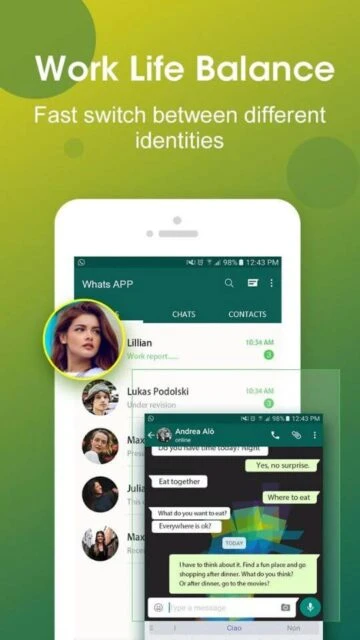
DO Multiple Accounts & Clone stands out in the virtualization market by offering a stable, lightweight engine capable of running unlimited instances of nearly any Android application. Unlike basic cloners that limit you to just two accounts, this app caters to power users who need to manage five, ten, or even more profiles simultaneously. In this guide, we break down how to leverage its proprietary “Lite Mode” for battery efficiency and secure your private data with the built-in Privacy Locker.
How to Get Started with DO Multiple Accounts
Setting up your first clone takes less than a minute, but configuring it for optimal performance requires a few specific steps.
- Grant Initial Permissions – Launch the app and approve the storage permission required to save cloned app data.
- Select App to Clone – Tap the “+” button and choose an app (e.g., WhatsApp) from your installed list.
- Rename Your Clone – Long-press the new icon to rename it (e.g., “Work WhatsApp”) for easy identification.
- Enable Lite Mode – Go to Settings > Lite Mode to reduce memory usage for resource-heavy social apps.
Who Should Use DO Multiple Accounts
This tool is engineered for users who need strict separation between multiple digital identities without carrying two phones.
- Social Media Managers – Who handle 5+ client accounts on Instagram or Facebook simultaneously.
- Hardcore Gamers – Players who farm resources on multiple accounts in Clash of Clans or ROBLOX.
- Privacy Advocates – Users wanting to hide specific apps behind a PIN code using the Privacy Locker.
- NOT ideal for – Users with very old devices (under 2GB RAM) as running multiple engines consumes significant resources.
DO Multiple Accounts Platform Compatibility
While primarily an Android utility, its ecosystem support extends to various Android-based environments.
| Platform |
Min. Version |
Unique Features |
Limitations |
| Android |
Android 5.0+ |
Infinite cloning, Privacy Locker, Custom Icons |
Requires extensive permissions |
| Desktop (Emulators) |
Bluestacks 5+ |
Supports cloning within emulated Android instances |
Performance depends on PC RAM |
| HarmonyOS |
2.0+ |
Fully compatible with Huawei’s Android layer |
Google Play Services may vary |
| iOS |
N/A |
Not available due to iOS sandboxing rules |
Cannot be installed on iPhone |
DO Multiple Accounts Integrations & Ecosystem
The app’s strength lies in its ability to bridge data between the host system and virtualized environments.
- Google Play Games – Syncs progress across cloned game accounts independently (requires plugin).
- Contact Sync – Mirrors your device contacts to cloned messaging apps like WhatsApp.
- Notification Manager – Consolidates alerts from all clones into a single unified notification bar entry.
- Privacy Locker – Integrates with the device fingerprint sensor for biometric security.
Best Alternatives to DO Multiple Accounts
If you experience compatibility issues, these competitors offer similar virtualization technology with different strengths.
- Parallel Space – Best for stability and broad compatibility, but has more aggressive ads in the free version.
- 2Accounts – Best for users who only need exactly two accounts (lighter weight than DO Multiple).
- Island (Early Access) – Best for enterprise users utilizing Android for Work profiles instead of virtualization.
- Shelter – Best for open-source privacy enthusiasts who want to isolate apps completely.
DO Multiple Accounts vs Top Competitors
Comparing the River Stone Tech solution against the market leaders reveals its advantage in volume cloning.
| Feature |
DO Multiple Accounts |
Parallel Space |
Dual Space |
| Pricing |
Free / VIP $5.99/mo |
Free / Pro $9.99/mo |
Free / Pro $4.99/mo |
| Key Strength |
Unlimited Clones |
Stability |
Speed |
| Target Users |
Power Users/Gamers |
General Users |
Casual Users |
| Unique Feature |
Lite Mode (Ram Saver) |
Themes Store |
Fast App Switcher |
| Offline Mode |
Yes |
Yes |
Yes |
DO Multiple Accounts Privacy & Security Overview
Virtualization requires broad permissions, making trust and privacy settings critical for this application.
| Security Aspect |
Implementation |
User Control |
| Data Encryption |
AES-256 for Locker |
Enable via Privacy Settings |
| Authentication |
Pattern / Fingerprint |
Can enable for specific clones |
| Data Collection |
Device ID, Crash Logs |
Opt-out in Settings |
| Third-Party Sharing |
Ad networks (Free ver) |
Removed in VIP version |
DO Multiple Accounts Accessibility Features
The developers have included several features to make managing multiple interfaces easier for everyone.
- Screen Reader – Compatible with TalkBack for navigating the clone list.
- Visual – Support for High Contrast Text and customizable icon borders.
- Motor – One-tap “Fast Switch” from the notification shade to change accounts.
- Languages – Localized in 20+ languages including Arabic, Spanish, and Chinese.
Power User Tips for DO Multiple Accounts
Unlock the full potential of the virtualization engine with these advanced configuration tricks.
- Create Desktop Shortcuts – Long-press a clone to place a direct launcher icon on your home screen (VIP only).
- Fix Crash Issues – If a clone crashes, change the “Clone Mode” in settings from ‘Speed’ to ‘Compatible’.
- Separate Google Accounts – Install the “Google Play Services Plugin” to sign in to different G-Suite accounts per clone.
- Battery Optimization – Whitelist DO Multiple in your phone’s battery saver to prevent missed notifications.
- Color-Code Icons – Use the icon editor to give your “Work” WhatsApp a blue rim and “Personal” a green rim.
DO Multiple Accounts Support & Community
While direct support is limited, resources are available for troubleshooting common virtualization errors.
- In-App Feedback – Direct ticket submission located in the ‘Me’ tab > Feedback.
- Official Email – [email protected] for account-specific issues.
- Facebook Page – Updates on version releases and server status for supported games.
- FAQ Section – Built-in help guide covering notification fixes and permission errors.

 41
41