DigiCal Calendar Agenda – Flexible scheduling with beautiful design
Stylish calendar app with sync, widgets, weather, and 560K+ public calendars
Customizable Android calendar app featuring seven calendar views, six widgets, weather integration, support for Google Calendar and Outlook sync, and over 560,000 public holidays and sports calendars.
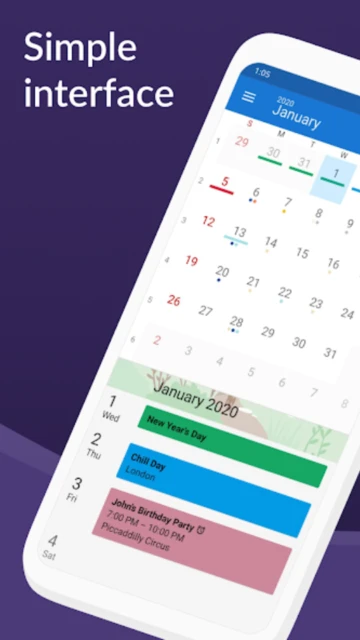
DigiCal Calendar Agenda is a stylish and flexible calendar application that syncs with major calendar services like Google Calendar, Outlook, and Exchange. Designed with Material Design principles, it offers a clean, modern interface in both light and dark themes for comfortable viewing throughout the day.
The app provides extensive customization through multiple calendar views, six customizable widgets, and 42 color options for organizing events. With access to over 560,000 public calendars, integrated weather forecasts, and advanced filtering capabilities, DigiCal adapts to any scheduling need.
Features Of DigiCal Calendar Agenda
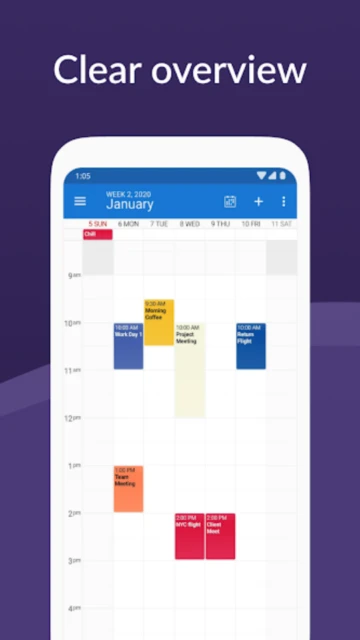
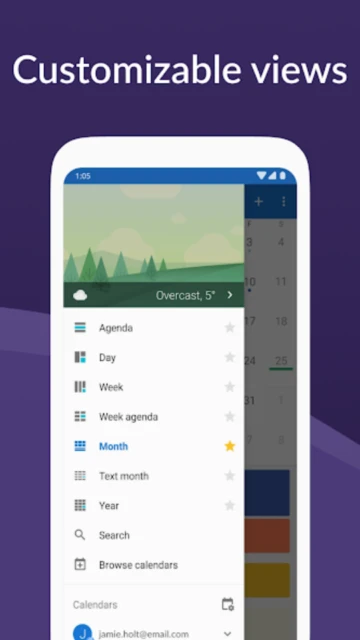
Seven flexible calendar views: day, week, month, agenda, text month, list, and year with heat map visualization
Six customizable home screen widgets with nine preset themes and custom color picker options
Synchronization with Google Calendar, Outlook, and Exchange for unified schedule management
Access to over 560,000 public calendars including holidays, sports, TV schedules, and finance calendars
Integrated weather forecasting with hourly details for next 48 hours and extended 15-day forecasts
Material Design dark theme for improved visibility at night and battery conservation
Event image matching in 27 languages for automatic visual identification
Combined date and time picker for faster and easier event scheduling
Manage invitations with RSVP functionality and reply directly to event organizers
Schedule appointments across multiple time zones for international coordination
Local calendar option for privacy-focused users requiring no cloud synchronization
Built-in location search using Google Places Autocomplete for address entry
Premium Features in the Paid Plan
DigiCal+ unlocks two additional widgets: month widget and month calendar widget for expanded home screen options
Year view with heat map feature to visually identify busy and free periods throughout your schedule
Full customization options for calendar widgets and agenda views without restrictions
Seven additional widget themes beyond the standard nine preset options available free
Access to all 42 theme colors for comprehensive color-coded organization
Custom snooze options for reminders and notifications
Remove all advertisements for seamless uninterrupted scheduling experience
Premium weather subscription for extended forecasts and detailed precipitation graphs
Calendar Store subscription for accessing entire collection of 560,000 public calendars
Free with ads; DigiCal+ one-time $5.49 purchase; Calendar Store yearly $2.50; Premium Weather yearly subscription
Free vs Premium Comparison
Feature
Free
Premium
Calendar Sync
Google Calendar, Outlook, Exchange sync supported
Unlimited sync plus exclusive services
Calendar Views
Seven views available
All seven views with enhanced customization
Widgets
Six widgets with nine themes
Eight widgets with sixteen themes
Weather
Basic weather display
Extended 15-day forecast with graphs
Heat Map
Not available
Year view heat map for scheduling
Color Options
Limited colors available
Full 42-color palette
Public Calendars
Limited selection
Access to 560,000+ calendars
Advertisements
Ads present throughout app
Completely ad-free
Frequently Asked Questions
How do I sync DigiCal with my Google Calendar?
Open DigiCal and go to settings. Select 'Calendars' and choose 'Add calendar'. Select Google Calendar from the list and authorize access. Your Google Calendar events will automatically sync and appear in DigiCal. You can customize which calendars display and sync frequency from the settings menu.
What is the difference between DigiCal and DigiCal+?
DigiCal is free with ads and includes seven views and six widgets. DigiCal+ ($5.49 one-time purchase) unlocks two additional widgets, full customization, all 42 colors, and removes advertisements. Calendar Store ($2.50 yearly) provides access to 560,000+ public calendars independently.
Can I use DigiCal completely offline?
Yes, DigiCal offers a local calendar option for private offline scheduling without requiring cloud synchronization. You can create, edit, and manage events locally. However, syncing features with Google Calendar, Outlook, or Exchange require internet connectivity.
Does DigiCal work on iOS or iPhone?
DigiCal is exclusively available for Android devices. There is no iOS version available. If you require a calendar app for iPhone, iOS, or iPad, you may want to explore other options like Google Calendar or Apple Calendar.
How do I subscribe to public calendars like sports schedules?
With a Calendar Store subscription ($2.50 yearly), browse the available 560,000+ public calendars in the app. Select desired calendars like sports teams, TV schedules, or holidays. Subscribed events automatically appear in your calendar without manual entry.
Can I customize the appearance of DigiCal?
Yes, DigiCal offers extensive customization. Choose from light or dark themes, select widget styles and themes, use the color picker to create custom themes, and adjust fonts and display sizes. DigiCal+ unlocks additional customization options and themes.
DigiCal Calendar Agenda is a beautifully designed Android calendar application that prioritizes flexibility and user customization. With its clean Material Design interface and powerful feature set, DigiCal provides an elegant solution for managing complex schedules. The app combines simplicity with advanced functionality, allowing users to organize their time exactly as they prefer.
Why Choose DigiCal?
DigiCal stands out for its exceptional design and flexible customization options that rival premium competitors. With a 4.5 star rating from over 179,000 users, the app has proven its reliability and value. It seamlessly integrates with major calendar services while offering privacy-focused local calendar options. The extensive widget library and color customization ensure your home screen reflects your personal style. DigiCal excels at making scheduling intuitive while preserving advanced functionality for power users.
Seven powerful calendar views: Day, week, month, agenda, text month, list, and year views with heat map for identifying free time slots
Comprehensive event management: RSVP handling, timezone support, event image matching in 27 languages, and location search with Google Places
Vast calendar library: Access over 560,000 public holiday, sports, TV, and finance calendars worldwide for automatic event population
How It Works
Open DigiCal and choose your preferred calendar view from seven options. Sync your Google Calendar, Outlook, or Exchange account for automatic event loading, or create local events for private scheduling. Customize home screen widgets from six available styles using nine preset themes or create your own with the color picker. Set your location to receive weather forecasts integrated into your calendar. Manage invitations directly in the app with RSVP functionality. Subscribe to public calendars for holidays and events automatically added to your schedule.
Who Should Use It?
DigiCal suits Android users who value beautiful design combined with powerful organization tools. It’s perfect for international professionals managing multiple time zones and calendars. Sports enthusiasts appreciate the extensive sports event calendar. Users concerned with privacy benefit from local calendar options. Those who want deep customization without paying premium prices find DigiCal’s pricing model appealing. Individuals seeking visual appeal alongside functionality discover DigiCal’s Material Design particularly satisfying.
User reviews and ratings for DigiCal Calendar Agenda
See what users think about DigiCal Calendar Agenda. Read honest reviews and ratings from real users.
4.5
★★★★★
3 reviews
Most beautiful calendar app on Android
by Jessica Wong
★★★★★
2025-11-25
DigiCal combines stunning design with powerful functionality. The Material Design interface is gorgeous, and customization options are extensive. The heat map feature helps me plan my week perfectly. Definitely the best-looking calendar app I've found.
Great features but occasional sync issues
by David Kumar
★★★★★
2025-10-18
DigiCal is feature-packed and visually appealing. The widget variety and weather integration are excellent. Sometimes sync with Google Calendar takes longer than expected, but overall it's reliable. The premium weather subscription is worth it for accurate forecasts.
Perfect for international scheduling
by Ana Santos
★★★★★
2025-09-30
Using DigiCal for managing schedules across multiple time zones. The timezone support is excellent, and the event image matching in multiple languages is incredibly useful. The public calendar library with sports and holidays from around the world is fantastic.
Write a Review
DigiCal Calendar Agenda Screenshots & Photos
Browse through screenshots and photos of DigiCal Calendar Agenda to see how it looks and works.
DigiCal Calendar Agenda Videos
Watch videos to see how this app works and learn about its features.