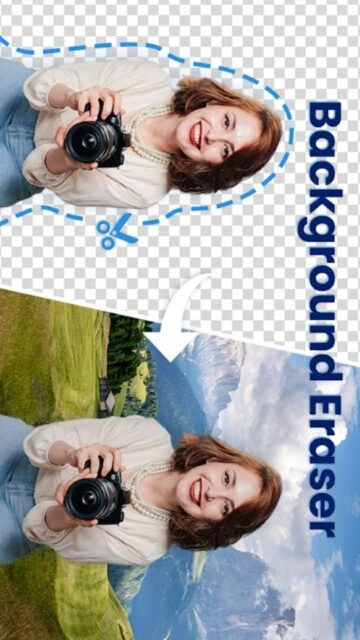
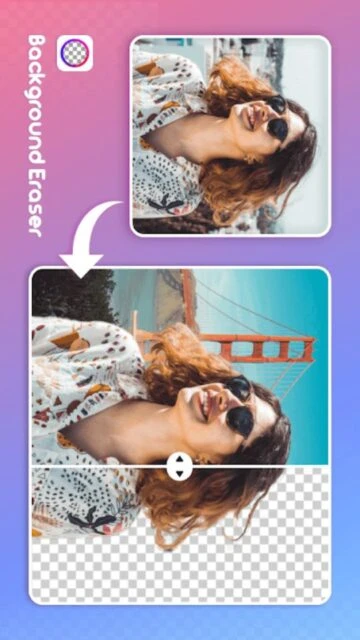
Cut & Paste Photo Editor allows for the seamless transplantation of image elements from one context to another. Its primary strength lies in its 'Background Changer' capability, which uses advanced edge detection to ensure that cutouts don't look jagged or fake when placed on a new backdrop.
The app is versatile enough to handle everything from professional product photography (making backgrounds transparent) to humorous face swaps. It includes a built-in repository of scenic backgrounds, textures, and famous landmarks to enhance your creative montages.
Features Of Cut & Paste Photo Editor
Auto-erase background with one-touch AI
Manual lasso tool for precise selection
Zoom and restore for correcting mistakes
Large library of scenic 4K backgrounds
Flip, rotate, and scale cutouts easily
Text editor with shadow and stroke options
Apply filters to match foreground and background
Save in PNG format with transparent background
Premium Features in the Paid Plan
No watermarks on saved images
Ad-free editing interface
Access to VIP background collection
High-resolution export quality
Unlimited daily cutouts
Priority processing speed
Advanced blending tools for realism
Premium sticker packs included
Free / $2.99 Monthly
Free vs Premium Comparison
Feature
Free
Premium
AI Cutout
Standard speed
Fast & High Precision
Watermark
Yes
None
Resolution
Medium Quality
Original Quality
Backgrounds
Limited Set
Full Library Access
Ads
Frequent
Zero Ads
Support
Standard
Priority
Frequently Asked Questions
Can I save images with transparent backgrounds?
Yes, you can save your cutouts as PNG files, which preserves transparency for use in logos or other projects.
Does it work on animals?
Yes, the AI is trained to recognize cats, dogs, and other common animals, not just human faces.
How do I fix rough edges?
Use the 'Smooth' slider after cutting to soften the edges, or use the manual 'Restore' brush to bring back accidentally erased parts.
Is it free to use?
The app is free to download and use, but saving high-resolution images without a watermark may require a subscription.
Can I use my own background?
Absolutely. You can select the 'Gallery' option to choose any photo from your own device as the new background.
Cut & Paste Photo Editor revolutionizes how you modify images by using AI detection to instantly separate subjects from their backgrounds. It replaces hours of manual erasing with a single tap, giving you the power to place yourself or objects into any scene imaginable.
Why Choose Cut & Paste?
The app features a smart ‘Auto Cut’ tool that identifies humans, animals, and cars with high precision. Unlike basic erasers, it includes a ‘Refine Edge’ feature to handle tricky areas like hair or fur. It’s the ultimate tool for creating memes, swapping faces, or placing yourself in travel photos you never took.
Smart Cutout: AI automatically detects and extracts the main subject.
Face Swap: Easily cut a face from one photo and paste it onto another.
Seamless Paste: Adjust brightness and contrast to match the new background.
How It Works
Upload a photo and let the Auto Mode remove the background. Use the manual lasso tool for fine-tuning. Once extracted, select a new background from the library or your gallery, place your cutout, and blend it to look natural.
Who Should Use It?
Ideal for meme creators, eBay sellers needing white backgrounds, and social media users wanting to create fun, surreal edits or fix group photos by adding missing people.
User reviews and ratings for Cut & Paste Photo Editor
See what users think about Cut & Paste Photo Editor. Read honest reviews and ratings from real users.
4.7
★★★★★
3 reviews
Best background remover
by Sarah P.
★★★★★
2025-11-01
I sell clothes on eBay and this app is a lifesaver. It removes the messy room background instantly so I can put a white one. Highly recommend!
Funny face swaps
by Mike T.
★★★★★
2025-10-20
Used it to swap my cat's face with my brother's. The result was hilarious and the edges looked surprisingly real. Great fun.
Good but needs patience
by Linda K.
★★★★★
2025-09-15
The auto cut is good 90% of the time, but sometimes you have to fix the hair manually. Still faster than other apps I tried.
Write a Review
Cut & Paste Photo Editor Screenshots & Photos
Browse through screenshots and photos of Cut & Paste Photo Editor to see how it looks and works.
Cut & Paste Photo Editor Videos
Watch videos to see how this app works and learn about its features.

 46
46