CapCut stands as a versatile AI-powered video editor from ByteDance, designed for creators who demand quick, professional results across social platforms like YouTube, Instagram, and TikTok. It emerged to simplify complex editing tasks with intuitive tools, filling the gap for mobile-first users tired of clunky software that slows down content pipelines.
In 2026, CapCut evolves with advanced AI features like auto-captions, text-to-speech, and one-click enhancers, positioning it as a go-to for short-form video dominance while scaling to longer projects. This focus on accessibility and speed addresses the explosion of user-generated content, where efficiency trumps perfection for most.
How to Get Started with CapCut
CapCut’s onboarding flows smoothly, greeting new users with a clean interface that prompts account creation via email, Google, or TikTok, then dives into a quick tutorial highlighting core tools like trimming and effects. You expect seamless project setup from your gallery or camera, with AI suggestions popping up to guide edits without overwhelming beginners.
- Download and Install – Grab CapCut from the App Store, Google Play, or official site; installation takes seconds, and it launches directly into a welcome screen offering templates to jumpstart your first video.
- Create a New Project – Tap the “+” icon to import media from your device or cloud storage; the app auto-detects clips and suggests aspect ratios suited for TikTok or Instagram Reels.
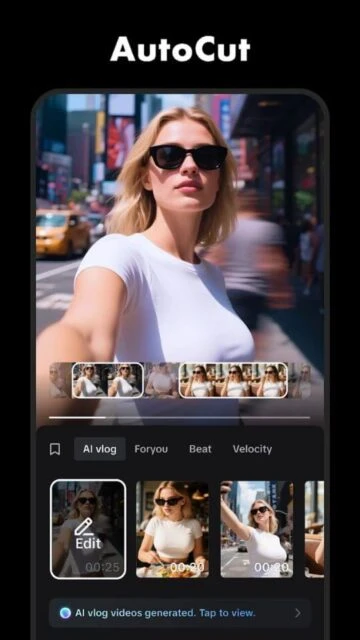
- Explore Basic Edits – Use the timeline to trim, split, or add transitions; expect real-time previews and AI auto-cuts that adjust pacing based on music beats.
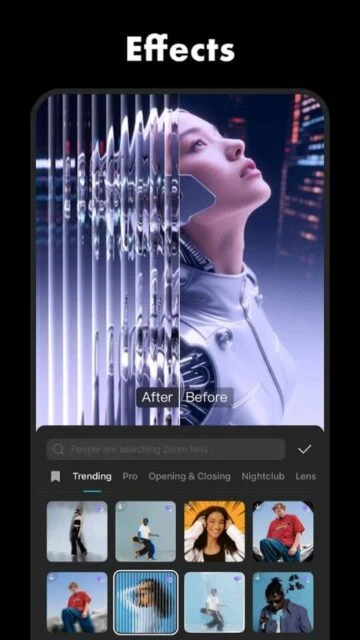
- Add Effects and Export – Layer text, stickers, or AI effects from the library; preview renders instantly, then export in up to 4K with options for direct social sharing.
Who Should Use CapCut
CapCut targets content creators prioritizing speed and mobile convenience, from social media influencers crafting daily Reels to small businesses producing quick ads, all benefiting from its AI-driven shortcuts that cut editing time without sacrificing polish.
Ideal Users
- Social media influencers producing short-form videos need CapCut’s template library and effects; it fits because one-tap enhancements match platform trends effortlessly.
- Beginner vloggers with smartphones value its intuitive timeline; the app shines by offering pro results minus steep learning curves.
- TikTok or Instagram marketers seek viral-ready tools; CapCut delivers with synced music and captions tailored for engagement.
Not Ideal For
- Professional filmmakers requiring multi-track audio mixing cannot rely on CapCut alone; it lacks depth for cinema-grade color grading and exports.
- Advanced users editing 4K features prefer desktop suites; CapCut’s mobile focus limits precision controls and plugin ecosystems.
- Offline-only workers in remote areas find its cloud AI features restrictive; basic cuts work, but premium effects demand internet.
CapCut Platform Compatibility
CapCut shines across mobile and web with native apps, but desktop versions lag in full feature parity, often requiring online access for AI tools that power its edge in quick edits. Android and iOS dominate usage, while web suits light tasks without installs.
| Platform |
Minimum Version |
Unique Features |
Limitations |
| iOS |
15.0 |
AR effects, haptic feedback |
Occasional crashes on older devices |
| Android |
7.0 |
Gesture controls, deeper storage access |
Slower exports on budget hardware |
| Web |
Latest Chrome/Firefox |
No-download editing, cloud sync |
No offline mode, limited AI depth |
| Desktop |
Windows 10/macOS 11 |
Multi-monitor support, keyboard shortcuts |
Fewer templates, Pro features app-locked |
CapCut Integrations and Ecosystem
CapCut builds a connected workflow through ByteDance ties and open APIs, linking seamlessly with TikTok for direct publishing and pulling assets from stocks like Pexels.
- Social Media Platforms – Direct exports to TikTok, Instagram, and YouTube optimize formats and add watermarks automatically, streamlining share cycles.
- Cloud Storage Services – Syncs with Google Drive and Dropbox for media import; expect fast pulls without local clutter.
- Music Libraries – Accesses Epidemic Sound and CapCut’s royalty-free tracks; AI matches beats to clips for instant rhythm edits.
- Third-Party Plugins – Supports LumaFusion imports and basic Zapier hooks; useful for automating workflows in marketing stacks.
Best Alternatives to CapCut
Exploring alternatives matters when CapCut’s TikTok focus feels limiting; rivals offer deeper customization or offline power for varied editing needs in 2026.
- InShot suits quick social clips with strong text tools; choose it for simpler interfaces minus CapCut’s AI bloat.
- VN Video Editor excels in gesture-based multi-layer edits; ideal if you prioritize free, ad-free precision on mobile.
- KineMaster delivers chroma key and blending modes; pick it for pro effects without subscriptions.
- Filmora provides desktop-mobile sync and stock media; go here for polished outputs beyond short-form.
- PowerDirector handles 4K stabilization best; select for action cam users needing speed ramps.
CapCut vs Top Competitors
We compare on mobile usability, AI reliance, and export speed—key for creators balancing quality and deadlines.
| Feature |
CapCut |
InShot |
VN Video Editor |
KineMaster |
| Pricing |
Free/Pro $7.99/mo |
Free/$3.99/mo |
Fully free |
Free/$4.99/mo |
| Key Strength |
AI auto-edits |
Text overlays |
Layer control |
Chroma key |
| Target Users |
Social creators |
Casual editors |
Precision users |
Effect pros |
| Unique Feature |
TikTok sync |
Collage maker |
Gesture trim |
Audio ducking |
| Offline Mode |
Partial |
Full |
Full |
Full |
CapCut Privacy and Security Overview
CapCut employs standard encryption and compliance measures tied to ByteDance policies, collecting usage data for AI improvements while offering deletion options, though concerns linger over China-based servers and ad tracking in free tiers. Users control sharing via granular settings.
| Security Aspect |
Implementation |
User Control |
| Data Encryption |
AES-256 for uploads and storage |
Toggle cloud backup off |
| Authentication |
OAuth via Google/TikTok, biometrics |
Enable/disable face ID login |
| Data Collection |
Analytics on edits, device info |
Opt-out in privacy dashboard |
| Third-Party Sharing |
Limited to partners like Epidemic Sound |
Review and revoke app permissions |
CapCut Accessibility Features
CapCut supports core accessibility through voiceover compatibility and adjustable interfaces, aiding users with visual or motor challenges, though it trails specialized apps in screen reader depth for complex timelines.
- VoiceOver/Screen Reader integration reads timeline elements and menus aloud; users navigate edits hands-free on iOS.
- High-contrast mode and scalable text boost visibility; toggle in settings for low-vision editing sessions.
- Keyboard shortcuts on desktop aid motor-impaired creators; pair with external mice for precise control.
- Reduced motion options minimize animations; essential for vestibular sensitivities during previews.
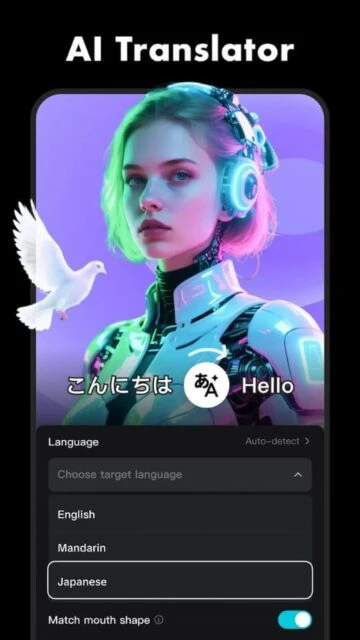
- Captions auto-generation with language toggles; supports deaf users in final outputs.
Power User Tips for CapCut
Power users leverage CapCut’s hidden layers for pro workflows; master these to push beyond basics on mobile or desktop.
- Chain keyframe animations with curve editors for smooth zooms; apply on Android for precise motion paths without lag.
- Use LUT imports for cinematic grading; desktop users sync custom packs via cloud for consistent branding.
- Script AI prompts in text-to-video; iOS gets best results with specific descriptors like “neon cyberpunk vibe.”
- Batch export queues save hours; web version handles 50+ clips overnight with watermark automation.
- Mask layers for compositing; pair with chroma on all platforms to isolate effects like floating text.
CapCut Support and Community
CapCut offers tiered support channels, from self-serve docs to paid chats, backed by a vibrant creator ecosystem for tips and templates.
Official Help Center – Comprehensive guides cover AI tools and troubleshooting; search yields video walkthroughs updated for 2026 features.
Community Forum – Reddit’s r/CapCut and Discord host user mods; share projects for feedback on effects chains.
Social Media – TikTok (@CapCutapp) and X post daily hacks; follow for beta access announcements.
Contact Support – In-app chat resolves Pro issues fast; email [email protected] for billing disputes.