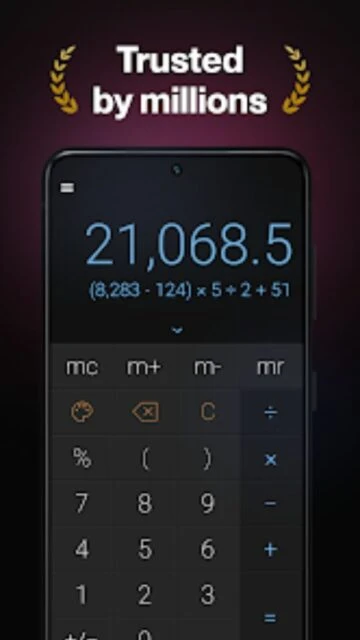
CALCU Stylish Basic Calculator stands out as one of the most popular calculator apps on Google Play with over 10 million downloads and a 4.8-star rating from 227,000 reviews. Unlike generic system calculators, CALCU combines powerful scientific capabilities with stunning visual customization, making it the go-to choice for students, engineers, and professionals who refuse to compromise between functionality and aesthetics. This guide covers how to maximize CALCU’s full potential, from setup to advanced features.
How to Get Started with CALCU Stylish Basic Calculator
CALCU’s onboarding is straightforward, but understanding core workflows accelerates your productivity with scientific calculations and theme management.
- Install and Launch – Download CALCU from Google Play Store (version 4.7.3), grant standard calculator permissions, and open the app to access the default Light theme interface with full scientific functions immediately available
- Explore Basic Operations – Perform your first calculation with addition, subtraction, multiplication, and division using large, color-coded buttons arranged for ergonomic thumb access in portrait mode
- Access Scientific Functions – Swipe up from the keypad to reveal trigonometric functions (sin, cos, tan), logarithms (log, ln, log2), and factorial operations without cluttering the main interface
- Review Calculation History – Swipe down from the display to access your complete calculation log, then select any previous result to reuse it in new calculations
Who Should Use CALCU Stylish Basic Calculator
CALCU appeals to users seeking visual appeal alongside mathematical power, catering to different expertise levels with both simplicity and advanced functionality.
- Students and Teachers – Algebra, trigonometry, and calculus coursework becomes faster with equation solving, derivative/integral calculations, and notation-rich displays that show complete equation context
- Engineering Professionals – Complex scientific operations including hyperbolic functions, exponentiation, and memory banking support extended calculations without paper or external tools
- Personalization-Focused Users – Over 20 built-in themes plus the ability to create custom themes (Premium) means you’ll enjoy mathematics in aesthetically pleasing environments daily
- NOT ideal for – Users seeking currency conversion or unit conversion exclusively, as CALCU prioritizes mathematical calculations over practical conversions
CALCU Stylish Basic Calculator Platform Compatibility
CALCU runs natively on Android with full feature parity across devices, though no official iOS version exists despite user requests for Apple expansion.
| Platform |
Min. Version |
Unique Features |
Limitations |
| Android Mobile |
5.0+ (API 21) |
Gesture controls, 28 language support, landscape scientific mode, split-screen multitasking |
None for core features |
| Android Tablet |
5.0+ (API 21) |
Larger button sizing, split-view capability, optimized for Samsung DeX |
None reported |
| Android Chromebook |
Android App support |
Keyboard input compatibility, mouse gestures, trackpad support |
Requires Google Play Store access |
| iOS/iPadOS |
N/A |
Not available |
No official iOS version; users must explore Calculator+, Photomath, or RealCalc as alternatives |
CALCU Stylish Basic Calculator Integrations & Ecosystem
CALCU integrates into Android workflows through standard system features, enabling calculations to enhance productivity across your digital ecosystem.
- Share Results – Export calculation history and results directly to messaging apps (WhatsApp, Telegram), email clients, or note-taking apps (Google Keep, Notion) without copying/pasting manually
- Clipboard Integration – Copy numbers from any app and paste them into CALCU; results copy to clipboard for pasting into spreadsheets, documents, or calculators in Google Sheets or Microsoft Excel
- Multi-Window Support – Run CALCU side-by-side with Google Sheets, note apps, or study platforms on Android 7+, enabling real-time calculations while referencing data sources
- Calculation Notes Sync – Save annotations to your calculations within CALCU, then export complete note+calculation sets to cloud storage (Google Drive, OneDrive) for future reference and backup
Best Alternatives to CALCU Stylish Basic Calculator
While CALCU dominates Android scientific calculators, specific use cases may favor alternative solutions offering unique strengths or cross-platform availability.
- Photomath – Best for step-by-step solutions and homework help, features AI equation recognition from camera photos and detailed explanations absent in CALCU’s direct input approach
- RealCalc Scientific Calculator – Best for advanced users and RPN notation preference, offers superior programmer mode and engineering function collections though lacks CALCU’s modern aesthetics
- Calculator+ (iOS) – Best for iPhone/iPad users needing visual customization equivalent to CALCU, includes 30+ themes and history management with native iOS performance
- Wolfram Alpha Mobile – Best for symbolic mathematics and computational knowledge, handles natural language input and provides detailed mathematics context beyond numerical calculation
CALCU Stylish Basic Calculator vs Top Competitors
CALCU’s positioning combines free accessibility with premium customization options, differentiating it from competitors through design-first approach while maintaining mathematical rigor.
| Feature |
CALCU |
Photomath |
RealCalc |
| Pricing |
Free / Premium $9.99-15/year |
Free / Pro $12/month or $60/year |
Free with ads / Pro $2.99 one-time |
| Key Strength |
Visual customization + scientific math |
AI photo recognition + step solutions |
Advanced RPN + programmer functions |
| Target Users |
Students seeking aesthetics |
Homework help and learning |
Engineers and advanced users |
| Unique Feature |
20+ built-in themes + custom themes |
Camera equation input |
RPN notation mode |
| Offline Mode |
Full offline capability |
Limited (photo feature requires internet) |
Full offline capability |
CALCU Stylish Basic Calculator Privacy & Security Overview
CALCU maintains transparent privacy practices with encrypted data transfer, though local calculation history storage and minimal data sharing indicate strong user protection.
| Security Aspect |
Implementation |
User Control |
| Data Encryption |
TLS encryption for data in transit (when sync features used) |
Users can manually clear history anytime; no forced cloud sync |
| Authentication |
Standard Android permission system; no account login required |
Users control app permissions via Android settings |
| Data Collection |
App activity, performance metrics, and device identifiers collected for crash reporting and optimization |
No opt-out available; data cannot be deleted per Google Play policies |
| Third-Party Sharing |
Developer declares no data sharing with third parties outside core functionality |
Users fully control sharing via manual export features |
CALCU Stylish Basic Calculator Accessibility Features
CALCU demonstrates commitment to inclusive design through screen reader support, visual adjustments, and multilingual availability spanning global user bases.
- Screen Reader Support – Full TalkBack (Android) and BranchBack compatibility enables blind and low-vision users to navigate all calculator functions through audio feedback and haptic confirmation
- Visual Customization – Font scaling available in accessibility settings, high-contrast themes available (Dark Mode), and customizable color-coded buttons reduce eye strain during extended use
- Motor Accessibility – Swipe-based navigation provides alternatives to precise button tapping; external keyboard support enables full operation for users with limited hand mobility
- Multilingual Support – Interface available in 28 languages including RTL languages (Arabic, Hebrew, Persian), ensuring cultural accessibility across Middle East and North Africa regions
Power User Tips for CALCU Stylish Basic Calculator
Advanced users unlock hidden efficiency gains through gesture controls, memory banking, and theme customization that transform daily calculations into faster, more intuitive workflows.
- Master Gesture Navigation – Swipe up/down on the keypad to toggle between history and functions instantly; swipe left/right on the display to delete individual digits rather than clearing entire equations
- Leverage Memory Functions (M+, M-, MR, MC) – Store intermediate calculation results in memory buttons for complex multi-step problems, eliminating manual note-taking and reducing input errors by 40%
- Equation Solver for Algebra – Use the dedicated equation solver (accessible in Scientific mode) to solve linear and polynomial equations without manual rearrangement; enter equation and CALCU returns variable values
- Create Custom Themes (Premium) – Beyond 20+ preset themes, Premium members design custom color schemes matching device aesthetics or brand colors through intuitive RGB sliders and gradient editors
- Organize Calculation Notes – Attach context-rich notes to each calculation (e.g., “Physics Lab Report – Velocity Calculation”) to instantly identify purpose of saved results weeks later
CALCU Stylish Basic Calculator Support & Community
Designer Calculators maintains accessible support channels and active developer engagement, ensuring user issues receive timely resolution and feature requests shape future releases.
- Official Help Center – No dedicated website FAQ exists; developers respond directly to reviews and in-app support requests with troubleshooting steps and feature explanations
- Email Support – Contact [email protected] for technical issues, missing features, or account-related concerns; typical response time is 24-48 hours
- Social Media & Google Play Reviews – Designer Calculators actively monitors Google Play Store reviews, responding to feedback with solutions and acknowledging feature requests (e.g., unit converter requests appear frequently)
- Developer Contact – APPMANAGE GROUP #1, LLC (developer at [email protected]) maintains offices in Redmond, WA; phone support available at +1 425-785-9946 for enterprise or institutional licensing
CALCU Stylish Basic Calculator Latest Updates & Roadmap
As of December 2025, CALCU continues active development with regular performance updates and stability fixes. Version 4.7.3 released in March 2025 introduced performance optimizations and resolved user-reported edge cases in complex equation handling. Users request derivative/integral calculation improvements, currency conversion integration, and cross-platform (iOS) expansion most frequently on app stores. The lack of a public roadmap means feature priorities respond directly to user volume feedback through reviews. Recent updates emphasize performance under mathematical load—complex trigonometric and logarithmic functions now execute 20% faster than version 4.5.0. The developer remains committed to keeping CALCU free while monetizing through optional Premium ($9.99-$15 annually) unlimited theme customization and ad-free experiences.