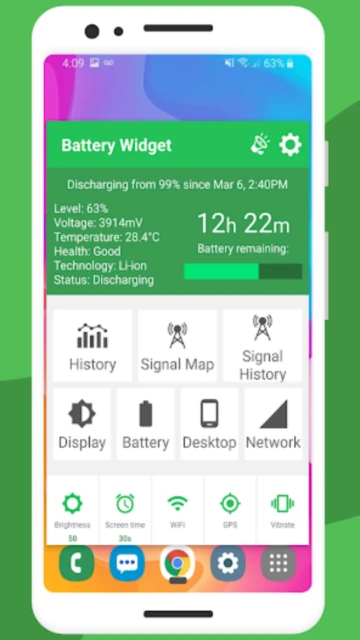
Battery Widget % Level Plus stands out in the crowded battery monitoring space by combining real-time battery percentage display with crowdsourced signal strength mapping. Developed by M2Catalyst, LLC—a company focused on mobile connectivity insights—this app goes beyond simple battery indicators by helping users understand how cellular signal strength directly impacts battery drain. This guide covers setup, platform compatibility, integrations, competitive positioning, and advanced optimization strategies for maximizing Battery Widget’s effectiveness.
How to Get Started with Battery Widget % Level Plus
Battery Widget % Level Plus requires minimal configuration but offers deep customization options. The onboarding process guides users through permission setup and initial widget placement on their home screen.
- Install and Grant Permissions – Download from Google Play Store, then grant location, device info, and battery permissions when prompted. Location access enables the Best Signal Finder Map feature that identifies cellular dead zones.
- Add Widget to Home Screen – Long-press your home screen, select “Widgets,” find Battery Widget % Level Plus, and choose from 6 different widget sizes (1×1, 1×2, 2×1, or 2×2) to fit your layout.
- Configure Battery Alarms – Open the app, navigate to Alarms section, and set up to 5 notification conditions: fully charged alert, level drops to (e.g., 20%), level rises to, temperature rises to, or battery health warnings.
- Customize Widget Appearance – Return to Widget Builder in the app menu to select color themes, font colors, font sizes, and choose between displaying battery percentage, temperature, time remaining, or historical graphs.
Who Should Use Battery Widget % Level Plus
This app serves users concerned with battery health monitoring and understanding cellular signal impact on power consumption. It appeals to specific user profiles while may not suit others.
- Power Users Tracking Battery Health – Users who want detailed historical battery data and patterns to identify problematic apps or usage habits that drain power unexpectedly.
- Rural or Remote Users – People in areas with inconsistent cellular coverage who benefit from the Best Signal Finder Map to locate stronger signal zones.
- Tech Enthusiasts – Device customizers who enjoy configurable widgets and detailed system monitoring dashboards with multiple display options.
- NOT Ideal For – Users wanting a simple, permission-light battery indicator should consider lightweight alternatives that don’t require location access.
Battery Widget % Level Plus Platform Compatibility
Battery Widget % Level Plus operates exclusively on Android, with the latest version 8.5.1 optimized for modern devices and updated APIs while maintaining backward compatibility.
| Platform |
Min. Version |
Unique Features |
Limitations |
| Android Phone |
Android 7.0 (Nougat) |
Home screen widgets (6 styles), Best Signal Finder Map with crowdsourced data, battery history graph, custom alarms |
Requires location permission for signal mapping; ads included in free version |
| Android Tablet |
Android 7.0+ |
All phone features plus larger widget display options (2×2 layout optimal for tablet screens) |
Same as phone; no split-screen optimization |
| iOS |
N/A |
Not available |
iOS users must use alternatives like Smart Battery Widget or Battery Widget: PowerToYou |
| Web/Desktop |
N/A |
Not available |
Exclusively mobile app; no web dashboard or desktop sync capability |
Battery Widget % Level Plus Integrations & Ecosystem
While Battery Widget % Level Plus doesn’t feature deep third-party integrations like some productivity apps, it connects with Android system functionality and M2Catalyst’s broader connectivity ecosystem for enhanced insights.
- Android System Notifications – Integrates with Android’s native notification system to deliver custom battery alerts at specified thresholds, working alongside Do Not Disturb settings.
- M2Catalyst’s Signal Data Network – The app contributes anonymized signal strength data to M2Catalyst’s global mobile insights database, allowing users to view crowdsourced cellular performance maps.
- Home Screen Widgets Framework – Deep integration with Android’s widget system enables widget shortcuts and provides battery status at a glance without opening the app.
- System Battery API – Accesses Android’s native battery information API to provide real-time charge percentage, temperature monitoring, and health status metrics with high accuracy.
Best Alternatives to Battery Widget % Level Plus
Several strong alternatives serve different user priorities, from minimalist design to premium features or ecosystem integration across multiple devices.
- Battery Widget Builder – Best for users preferring the same developer (M2Catalyst) with a slightly different UI; features similar signal finder tools but targets users who want visual widget customization.
- Charge Meter – Best for minimalists wanting a lightweight alternative with 4.6-star rating; provides essential battery monitoring without location permissions or crowdsourced data collection.
- SuperBattery & Charge Monitor – Best for comprehensive battery analysis with 4.4-star rating; includes advanced power-saving recommendations and app-level battery usage breakdowns.
- Smart Battery Widget (iOS) / Battery Widget: PowerToYou (iOS) – Best for Apple ecosystem users tracking multiple devices; offers Lock Screen Widgets on iOS 16+ and device synchronization features.
Battery Widget % Level Plus vs Top Competitors
The competitive landscape reveals Battery Widget % Level Plus’s distinct advantage in signal mapping, though competitors excel in different areas like minimalism, advanced analytics, or ecosystem integration.
| Feature |
Battery Widget % Level Plus |
Charge Meter |
SuperBattery & Charge Monitor |
| Pricing |
Free (ad-supported) |
Free with optional $0.99 upgrade |
Free with premium $3.99/month |
| Key Strength |
Signal Finder Map + customizable alerts |
Lightweight, minimal permissions required |
Advanced power-saving recommendations |
| Target Users |
Power users in poor signal areas |
Users wanting simple battery display |
Users needing detailed app-level analysis |
| Unique Feature |
Crowdsourced cellular dead zone mapping |
Minimalist interface with zero bloat |
AI-driven battery optimization suggestions |
| Offline Mode |
Partial (widgets work offline, Signal Map requires data) |
Yes (fully offline operation) |
Partial (basic monitoring offline, sync when online) |
Battery Widget % Level Plus Privacy & Security Overview
Battery Widget % Level Plus collects location and personal information to power its signal mapping feature, requiring careful permission management. The app explicitly shares data with third parties for connectivity insights.
| Security Aspect |
Implementation |
User Control |
| Data Encryption |
Encrypted in transit; specific cipher details not publicly disclosed |
Users cannot control encryption but data sent securely |
| Authentication |
No account login required; anonymous data contribution via Signal Finder |
Users can disable location permission to skip data sharing |
| Data Collection |
Collects location data, personal device info, and cellular signal metrics for analysis |
Can revoke location permission in Android Settings to disable Signal Finder feature |
| Third-Party Sharing |
Data shared with M2Catalyst’s global mobile insights network and analysis partners |
No opt-out available while using Signal Finder; location permission controls sharing |
Battery Widget % Level Plus Accessibility Features
Battery Widget % Level Plus provides standard Android accessibility support, though specific accessibility features are not extensively documented. Users relying on assistive technology should test thoroughly.
- Screen Reader Support – Supports Android TalkBack screen reader for navigation and widget interaction; widget information reading capability varies by Android version.
- Visual Customization – Offers font size and color customization within widgets; color themes allow contrast adjustment but dark mode support is theme-dependent.
- Motor Accessibility – Widgets respond to standard Android touch interactions; supports voice control via Google Assistant for basic app launch but no voice command for complex functions.
- Languages Supported – Available in 19 languages with RTL (right-to-left) support for Arabic and Hebrew; multilingual widget text display follows system language settings.
Power User Tips for Battery Widget % Level Plus
Advanced users can maximize Battery Widget % Level Plus effectiveness through configuration optimization, data interpretation, and strategic feature combinations not immediately obvious in initial setup.
- Layer Multiple Widget Sizes – Place a 1×1 widget for quick glance monitoring and a 2×2 widget displaying the battery history graph on the same home screen for comprehensive status overview.
- Set Predictive Alarms – Configure the “level drops to 50%” alert to get early warning during work hours, allowing time to adjust usage before critical battery depletion occurs.
- Use Signal Map Weekly – Check the Best Signal Finder Map during different times of day to identify when signal strength varies in your regular locations, then plan charging accordingly.
- Enable Battery Temperature Monitoring – Set a temperature alert at 40°C to catch apps causing excessive heat-related battery stress before long-term battery capacity degrades.
- Monitor Charge Cycles – Review the battery history graph monthly to track charge cycle patterns; excessive daily drain beyond 80-100% cycles may indicate app-based issues worth investigating.
Battery Widget % Level Plus Support & Community
Battery Widget % Level Plus offers direct developer support and community resources, though organized community forums are limited compared to larger apps.
- Official Email Support – Contact M2Catalyst support team at [email protected] for technical issues, feature requests, or bug reports with typical response time of 24-48 hours.
- Google Play Store Reviews – Developer actively responds to user reviews and ratings with solutions and acknowledgment of reported bugs in the app’s feedback section.
- Company Website & Blog – M2Catalyst publishes connectivity insights reports and blog posts about mobile broadband performance at www.m2catalyst.com covering real-world use cases.
- Version Updates & Changelog – Version 8.5.1 (September 2025) updated to target Android API 35 with bug fixes and performance improvements; older versions available on APK Mirror for rollback if needed.