Adobe Acrobat Reader is the industry-leading application for viewing, printing, and signing PDF documents. It provides a seamless bridge between desktop and mobile workflows, ensuring that complex documents retain their formatting regardless of the device used.
Beyond simple viewing, the app serves as a central hub for document collaboration. Users can share files for review, track pending actions, and receive real-time notifications when others open or comment on their shared documents, streamlining team communication.
Features Of Adobe Acrobat Reader: Edit PDF
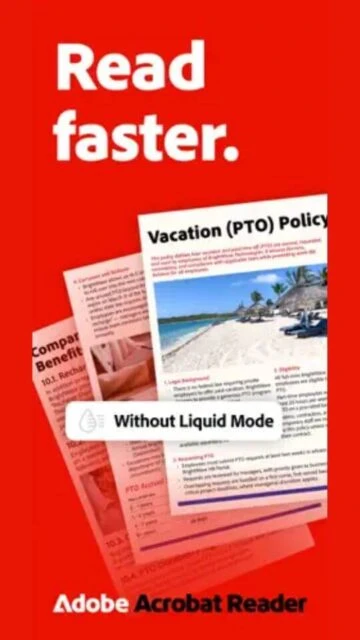
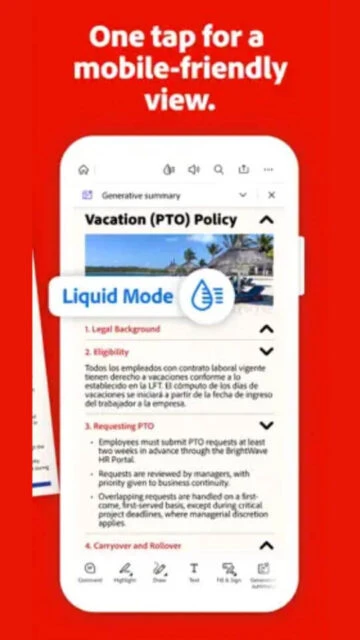
View PDFs with Liquid Mode for mobile optimization
Add comments, sticky notes, and text highlights
Fill out interactive forms and tax documents
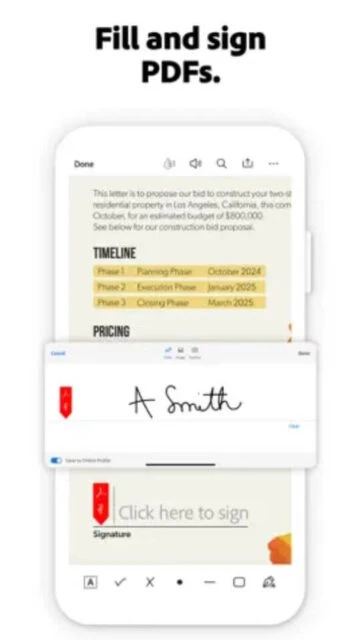
Sign documents with your finger or stylus
Store and access files in Adobe cloud storage
Share files with others for viewing or commenting
Dark mode for comfortable reading at night
Search text within large document files quickly
Premium Features in the Paid Plan
Edit text and images directly in the PDF
Convert PDFs to Microsoft Word, Excel, or PowerPoint
Combine multiple files into a single PDF document
Compress files to reduce size for easier sharing
Organize pages by reordering, rotating, or deleting
Protect documents with passwords and encryption
Advanced export options for image formats
Dedicated customer support for premium users
Free / Premium $12.99/month
Free vs Premium Comparison
Feature
Free
Premium
Liquid Mode Reading
Included
Included
Edit Text & Images
Read-only
Full Editing
Convert to Word/Excel
Not available
Unlimited
Fill & Sign Forms
Included
Included
Combine Files
Not available
Unlimited
Cloud Storage
Limited basic
Premium tier
Frequently Asked Questions
Is Adobe Acrobat Reader completely free?
The app is free for viewing, commenting, and signing documents. Advanced features like editing and converting require a Premium subscription.
What is Liquid Mode?
Liquid Mode uses AI to intelligently reformat PDF text and headers to fit your mobile screen, making reading much easier without zooming.
Can I edit a PDF without paying?
No, editing text and images is a premium feature. You can only add comments, highlights, and signatures in the free version.
Does it sync with Google Drive?
Yes, you can connect your Google Drive or OneDrive accounts to access and save files directly within the Acrobat app.
How do I sign a document?
Open the document, tap the 'Fill & Sign' tool, create your signature once, and then tap anywhere on the page to place it.
Adobe Acrobat Reader remains the gold standard for PDF interaction, ensuring your documents look exactly as intended on any screen. With over 600 million installs, it offers the most reliable viewing engine combined with a robust ecosystem for professional document management.
Why Choose Acrobat Reader?
If accuracy and compatibility are paramount, Acrobat is the safest choice. It pioneered the PDF format and continues to lead with features like Liquid Mode, which intelligently reflows static PDFs into readable mobile layouts, saving you from constant pinching and zooming.
Liquid Mode: Automatically reformats text and images for easy reading on small mobile screens.
Universal Reliability: Opens every type of PDF content including forms and 3D objects correctly every time.
Fill & Sign: Quickly complete forms and add legally binding e-signatures with your finger or stylus.
How It Works
Open any file from your device, email, or Google Drive. Use the bottom menu to switch between viewing, commenting, and editing tools, or toggle Liquid Mode at the top for an enhanced reading experience.
Who Should Use It?
Essential for business professionals, legal teams, and anyone who needs guaranteed compatibility and advanced form-filling capabilities without formatting errors.
User reviews and ratings for Adobe Acrobat Reader: Edit PDF
See what users think about Adobe Acrobat Reader: Edit PDF. Read honest reviews and ratings from real users.
4.6
★★★★★
3 reviews
Liquid Mode is a lifesaver
by Elena R.
★★★★★
2025-11-12
I read contracts on my phone daily. Liquid Mode makes them look like a responsive website instead of a tiny document. Unbeatable for reading.
Reliable but expensive
by Tom H.
★★★★★
2025-10-05
It never crashes and opens everything correctly, which I can't say for other apps. However, the monthly subscription for editing is quite steep.
Best for signing forms
by Jessica B.
★★★★★
2025-09-28
The fill and sign feature is the smoothest I've used. It detects form fields automatically and lets me sign in seconds.
Write a Review
Adobe Acrobat Reader: Edit PDF Screenshots & Photos
Browse through screenshots and photos of Adobe Acrobat Reader: Edit PDF to see how it looks and works.
Adobe Acrobat Reader: Edit PDF Videos
Watch videos to see how this app works and learn about its features.

 29
29