3C All-in-One Toolbox – Comprehensive Android Device Manager

Complete Android optimization suite with device manager, file explorer, app backup, battery analyzer, and CPU control.

About 3C All-in-One Toolbox

3C All-in-One Toolbox by Cedric Counotte is a professional-grade Android management suite providing comprehensive device control and optimization. The application consolidates numerous specialized tools including device manager, file explorer, application backup system, battery analyzer, CPU controller, and network monitor into a single cohesive platform.

Designed for both casual users and power users, the toolbox combines user-friendly interfaces with advanced technical capabilities. The app allows complete customization of the UI, enabling users to create personalized layouts matching their preferences. Extensive widget support provides real-time monitoring directly from device home screens. Advanced features include terminal emulator access, system logcat reading, and kernel configuration for experienced users and developers.

Features Of 3C All-in-One Toolbox

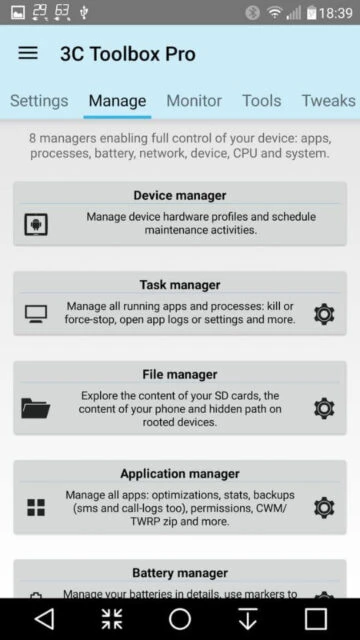
  • Device manager with powerful profiles, task scheduling, and device watchdog monitoring capabilities
  • File manager with thumbnails, folder size display, and support for Samba, FTP, WebDAV protocols
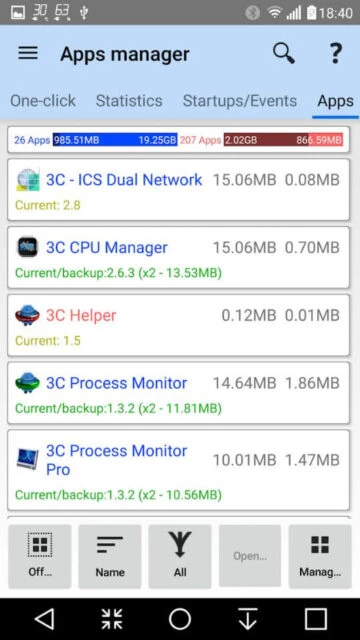
  • Application manager enabling complete app backup, restore, and Titanium Backup import functionality
  • Battery manager providing detailed consumption analysis and charge cycle history tracking
  • Network manager for configuring and monitoring network traffic and connectivity patterns
  • Task manager simplifying app organization with sorting options and uninstall capabilities
  • CPU manager controlling single to octacore processors and custom kernel settings
  • System and ROM configuration tools for advanced Linux kernel and Android OS settings modification

Premium Features in the Paid Plan

  • Hide or customize any app tabs and menu items according to user preferences and workflow needs
  • Edit main screen button layout with flexible up to 4x6 grid customization options available
  • Multi-select and batch organize apps with advanced sorting by various usage criteria
  • Automatic app backup scheduling and new app notification with history recording
  • Create multiple custom schedules, watchers, and profiles for complex device management scenarios
  • Automatic battery markers and management for devices with multiple battery configurations
  • Status bar notifications displaying key information with historical graphics and data visualization
  • Terminal Emulator and Script Editor enabling script sharing and optional boot execution

Free with in-app purchases and premium key

Free vs Premium Comparison

Feature Free Premium
File Management Basic file browsing and folder organization Advanced streaming from cloud services and network protocols
App Backup Standard backup functionality Split APK support and Titanium Backup compatibility
UI Customization Standard interface layout Unlimited customization with tab hiding and button grid editing
Automation Manual task execution only Multiple schedules and watchers with automation profiles
Advanced Features Limited to basic monitoring Terminal emulator, system logcat, and kernel configuration
Widget Options Basic widgets available Highly configurable widgets with historical graphics

Frequently Asked Questions

What features require root access?

CPU manager, ROM manager, and advanced system configuration require root. However, many features like file management, app backup, and battery monitoring work without root. Alternative 3C Companion app for PC provides workarounds for non-rooted devices starting with Android 6+.

Is there an iOS version available?

Currently, 3C All-in-One Toolbox is exclusively available for Android devices. The toolbox functionality is specifically designed around Android's open system architecture which iOS does not provide equivalent access to.

How do I restore backed up apps?

Access the Application Manager tab and select the backup you want to restore. The app supports importing Titanium Backup files as well. Select individual apps or batch restore multiple applications. Split APK restoration is available in premium version.

Can I customize the interface layout?

Yes, premium users can completely customize the interface. Hide unnecessary tabs and menu items, edit the main screen button layout up to 4x6 grid, and create personalized widget configurations. Free version offers limited customization options.

What phones are compatible?

3C All-in-One Toolbox supports Android 6.0 and higher devices. Some advanced features like CPU control require newer Android versions. The app is compatible with various phone manufacturers and custom ROMs including support for legacy devices.

Is my data secure with this app?

The app's two accessibility services do not collect user information according to privacy policy. Backup files are stored locally on your device. Review the official privacy policy for complete information regarding data handling practices.